Last week’s native-window release could open an editor, inspector, and tool palette as separate operating-system windows. Then an ordinary Dialog.show() inside the inspector looked for the current Form and appeared on the wrong surface.
That bug exposed every component that treated “top level” and “form” as synonyms. PR #5624 fixes those assumptions and adds something more visible: a Dialog can now become a real modal desktop window.
For VoIP, VPN, the AppKit port, OTP, contacts, and the rest of this release, read the weekly overview.
Two useful kinds of dialog
The default remains a lightweight dialog painted inside its owner’s layered pane. It matches Codename One styling and works on every port. A desktop application can make ordinary confirmation dialogs native windows while keeping the familiar static API:
Dialog.setDefaultNativeWindowMode(true);

boolean delete = Dialog.show(
        "Confirm deletion",
        "Delete Quarterly report.pdf?",
        "Delete",
        "Cancel");

if (delete) {
    deleteDocument();
}
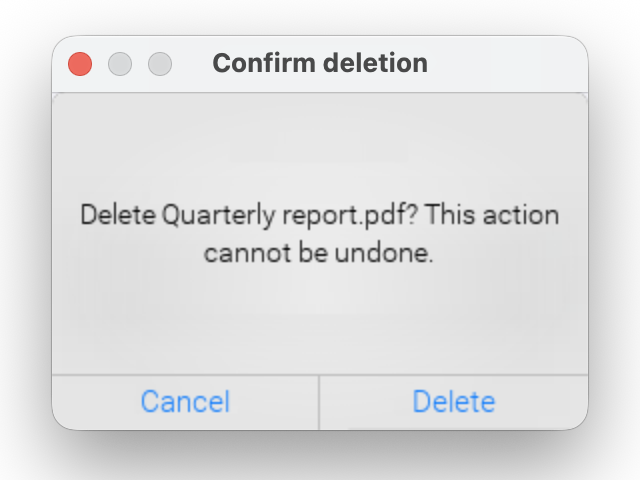
An actual JavaSE desktop capture on macOS. The title bar belongs to a separate operating-system window; the body and actions use the application’s Codename One theme.
The defaultNativeWindowModeBool theme constant provides the same application-wide setting without a startup call. For a single custom dialog, call setNativeWindowMode(true) on that instance. The instance setting wins over the static default, which wins over the theme. On a port without native windows, the dialog stays lightweight. There is no second code path to maintain.
Native-window mode is useful when the dialog must participate in desktop window ordering, focus, or task switching. Lightweight mode is usually better for a small prompt that should inherit the exact visual treatment of its owner.
Ownership was the real bug
Dialog, Sheet, ToastBar, ComboBox, FloatingActionButton, InfiniteProgress, tooltips, and HTMLComponent all had paths that asked Display for the current form. That question has one answer, even when the event came from another window.
The corrected path starts with the component that caused the action:
Code that creates a dialog without a source component can bind it explicitly:
Dialog details = new Dialog("Details");
details.setTopLevelHost(inspectorWindow);
details.add(new Label("Selection metadata"));
details.show();
The dimming layer, popup position, focus restoration, repaint region, and input routing now belong to that window. Accessibility state is also maintained per top level, so opening an inspector does not replace the main form’s accessible root.
Popups should not become surprise windows
An anchored combo-box popup stays attached to its field. A floating-action submenu stays near its button. Turning either into an independent desktop window would break positioning and keyboard behavior, so the new native mode is limited to dialogs and interaction dialogs.
Picker inside a window still uses its lightweight popup. Toolbar remains a Form concept. A transition cannot animate one operating-system window into another because the two surfaces do not share a graphics context. Change content inside one window when an animated transition matters:
inspectorWindow.setContent(nextPanel, CommonTransitions.createFade(250));
Those limits are explicit because a fake cross-window animation would be less predictable than no animation.
The same contract on Windows and Mac
The test suite opens the same controls in 400 by 300, 900 by 700, and 1000 by 400 windows. The wide case catches code that still reads the main display width. Modal cases verify that the owner is blocked while other event-dispatch work can continue.
This also validates the new AppKit port against the existing Windows implementation. A platform port is much easier to trust when it must pass behavior captured by another native port instead of defining success for itself.
Desktop work without a desktop fork
The Window API is settling into the same pattern as this week’s call, VPN, and contact work. The common API owns the behavior application code can rely on. Each port handles the native surface it actually has. Unsupported behavior stays visible instead of becoming a silent approximation.
That consistency matters for security as well as polish. A confirmation must block the window that contains the sensitive operation. A popup must not leak input to another surface. Accessibility focus must remain attached to the content the user is operating. These details are small until the wrong window accepts a command.
Next, read how Catalyst gave way to a real AppKit application.
Discussion
Which dialog in your desktop application needs its own operating-system window, and which should remain an overlay?